Discussion
Loading...

Discussion

Log in
  • About
  • Code of conduct
  • Privacy
  • About Bonfire
VisualInk
VisualInk
@VisualInk  ·  activity timestamp 7 hours ago

VisualInk now lets you swap seemlessly between cinematic and our new illustrated screenplay format while you're playing your #visualnovels . This allows readers to quickly check the history of the story so far, and authors to view parts of the story with context. And it just looks pretty snazzy (in our opinion).
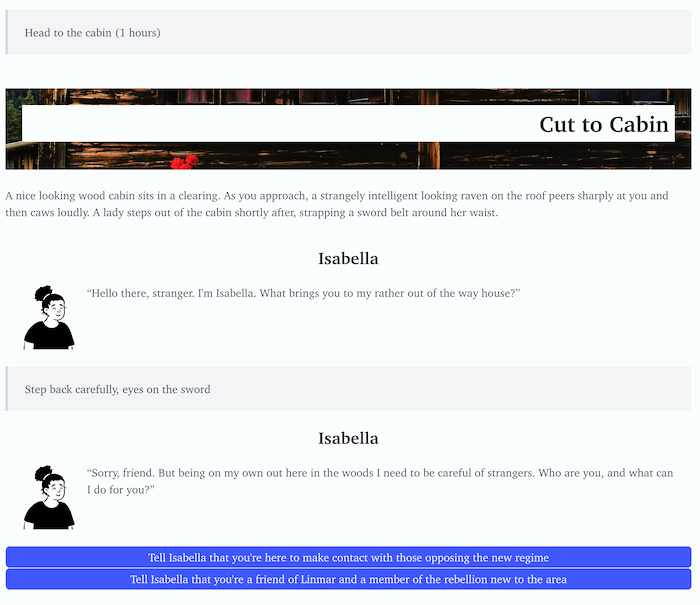
Part of a playthrough of a visual novel, but formatted roughly like a movie script. Cuts between scenes some a 'letterbox' view of the scene image being moved to, while lines of dialogue show thumbnail headshots of the current speaker.
1
  • Copy link
  • Flag this post
  • Block
VisualInk
VisualInk
@VisualInk replied  ·  activity timestamp 7 hours ago

You can play through the exercise that's shown in the screen shot here: visualink.mavnn.eu/published... . Use the menu at the top to switch between the two types of view.

Encounters | Visual Ink

  • Copy link
  • Flag this comment
  • Block

bonfire.mavnn.eu

News and community around mavnn.eu projects.

bonfire.mavnn.eu: About · Code of conduct · Privacy ·
Bonfire social · 1.0.1 no JS en
Automatic federation enabled
Log in
  • Explore
  • About
  • Public Groups
  • Code of Conduct