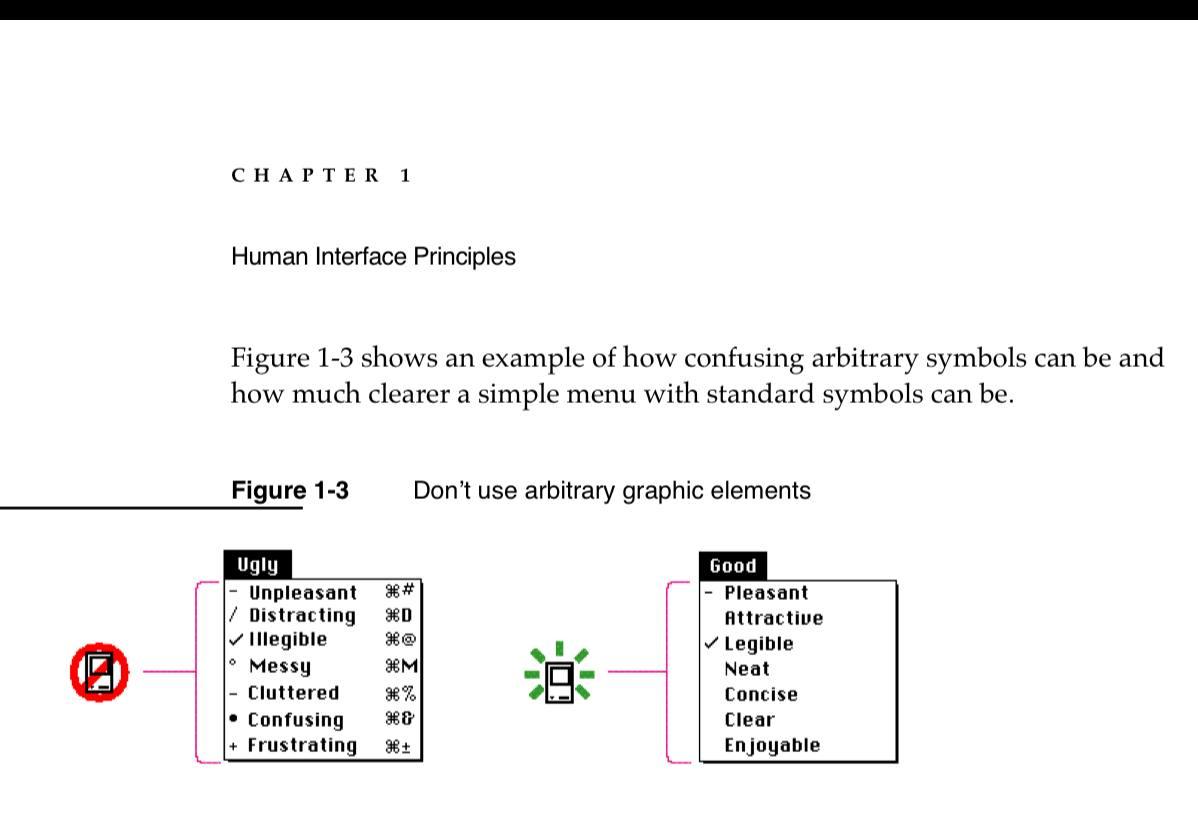
Pic. 1. Human Interface Guidelines, Apple, 1992
Pic. 2. macOS Tahoe, Apple, 2025
Pic. 1. Human Interface Guidelines, Apple, 1992
Pic. 2. macOS Tahoe, Apple, 2025

The icons in the 2nd image are not arbitrary so you can still argue that they're adhering to the interface guidelines.
Also, computer displays have evolved somewhat in the intervening decades so it's reasonable to revisit those principles as necessary.
@nikitonsky Of greater annoyance to me is Apple’s deteriorating legibility in a sea of minimalist grey. Plus omitting more useful features with every system upgrade. iTunes is a dysfunctional disgrace. My email recently went haywire, Google couldn’t fix it, so I took my Mac into a store and the amused girl simply clicked a grey circle in the toolbar and it all came back. I had never even noticed it and I don’t think I ever clicked it. Waste of half a day!
@nikitonsky I mostly agree but the modern day symbols aren't confusing, and are used in other areas like toolbar icons and in other operating systems.
@nikitonsky Icons can guide, but we would need to measure how much they help the user.
I’m currently experimenting with icons in a web app in such menus, but with toned down opacity (or rather with a quite bland tertiary color), and looking to see how much they help to guide the user while not feeling as clittered as menus with icons same as the text.
@nikitonsky and right at this moment in time some apfb had a nerve above his left eye explode
@nikitonsky, unfortunately, the HIG image seems also to be saying “don't show the keyboard shortcuts”.
@nikitonsky I miss back when icons were allowed to contain color
@nikitonsky agree with the dissenting options here. The symbols in the example are definitely arbitrary, while SF Symbols was created specifically for purposes such as this, with these actions in mind
@nikitonsky @mamsell yeah - it is very sad how little current apple seems to know about proven and correct user interface techniques and rules. One might hope that the departure of Alan Dye will help restore some, but the damage is done in strides across the system already. Not an easy one to fix consistently once the general rule of sanity/consistency has been broken, especially the way it has with liquid glass.
@nikitonsky I kind of disagreee with this. Icons are language-agnostic, and means less localization/translation needs to be done. It makes the menus more accessible. This is one case where I think Apple in the 90s was just wrong..
@USBTypeSTeve what does it even mean? How do icons reduce need for localization? Do you suggest Apple should stop translating UI texts? Or that Apple doesn’t have resource to do translations? What is your point?
@nikitonsky If you re-read what I said, I stated that icons are universally understood without the need for translation.
@USBTypeSTeve no, you stated that having icons means less localization/translation needs to be done. So: how come?
I know it's blasphemy to bag on the old AppleGuidelines, but - Icons are useful, especially for people still learning, like kids. As are listing the keyboard shortcuts. And it might just be they evolved for a reason.
This. Also note that none of these icons are arbitrary. In most cases you could drop the text and keep the icon. @nikitonsky @tbortels
@BenAveling @nikitonsky @tbortels Yes, let’s get 100 people to guess what the ‘Compress’ icon does.
@nikitonsky Wasn’t the stated reason on the next page something about the low graphical capabilities making it nigh impossible to create arbitrary legible menu icons?
@rosyna no, I don’t think so
@nikitonsky I don't know how many times I've bemoaned the fact that Apple spent millions and million on groundbreaking UI research in the early 1980s, and then threw it all away 15 years later.
Young interface designers, "Macintosh Human Interface Guidelines" is the single most important book you should read. Not even joking.
All of this has already been thought of.
@nikitonsky @jwz such perfect sample texts in the HIG 👌🏻
@nikitonsky
Under Steve Jobs, heads would have rolled.
@nikitonsky @jwz
AI sure does love using emojis.
@nikitonsky <spin doctor> shows how little we knew in 1992
News and community around mavnn.eu projects.