do you have a favourite man page? thinking of writing a short blog post exploring man pages and what makes a good one and I'd love some more examples
my contribution: I think it's cool that `man curl` includes an example for every single option
do you have a favourite man page? thinking of writing a short blog post exploring man pages and what makes a good one and I'd love some more examples
my contribution: I think it's cool that `man curl` includes an example for every single option
@b0rk hier(7)
I found it very early in my Unix career. I was exploring `/usr/spool/man/` to find out what there was. I stumbled on `hier.7` and it told me all the *other* places I should explore.
It might be how I found out about /etc/passwd.
@b0rk man cmus-tutorial. The format makes it really easy to read, and I have referred to it many times.
@b0rk I'm so happy with "tldr". Never touched a manpage since. ^^
@b0rk @bagder I always really liked "man hier" on FreeBSD explaining the filesystem hierarchy. Such a good user experience for an OS. https://man.freebsd.org/cgi/man.cgi?hier(7)
When I was at Etsy on the team maintaining the developer VMs, we replicated it with info about what could be found on the VMs.
Also one of my best open source experiences ever was that my patch to a curl man page got accepted 😇😁 https://github.com/curl/curl/commit/1074cca8cd420eddf724e6e0b40e60e6a080ada1
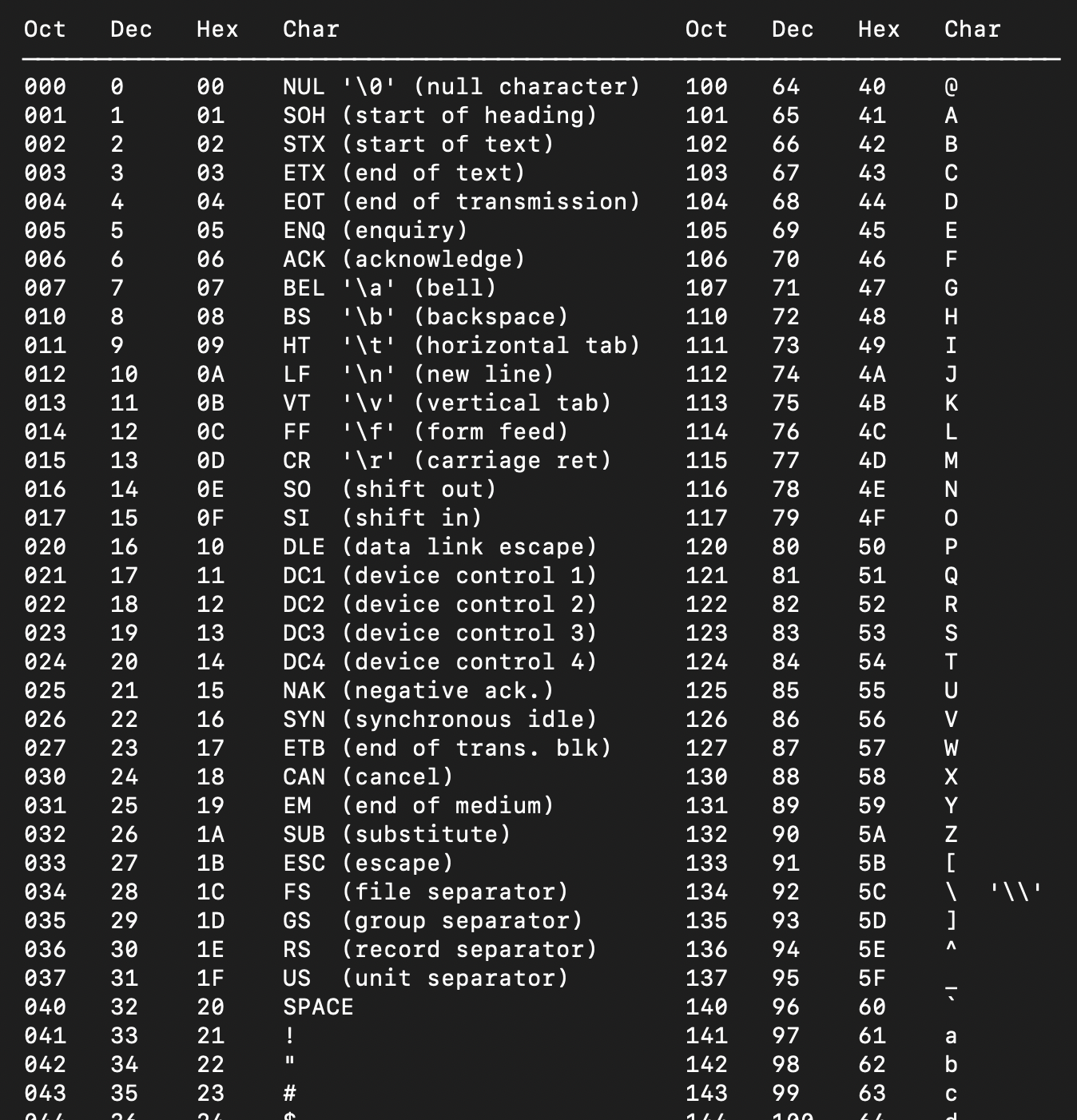
@b0rk This is probably not what you were looking for but "man ascii" is so good to have.
@b0rk openbsd man page for chmod is much easier to read than the one on linux in my opinion.
@b0rk `man ascii` is the one i look at most often
@b0rk I love tealdeer (tldr) precisely because it fills the gap in examples for every common operation
@b0rk my favorite one is man after midnight (gimme gimme gimme!)
https://unix.stackexchange.com/questions/405783/why-does-man-print-gimme-gimme-gimme-at-0030
@b0rk I find the BUGS section on Linux's man page cu(1) pretty amusing
@b0rk sox(1), for Sound eXchange (the Swiss Army knife of audio manipulation). It's very long, yet gives examples of all of its filters and complicated syntax.
Its sound format conversion section got so long that it ended up in soxformat(7)
@b0rk I like the man page for strace, because it groups the options by categories: General/Startup/Tracing/Filtering/Output. This makes it easier to discover what is available for a specific purpose. Other man pages just list the options strictly alphabetically (let's say for example the GNU ls man page).
@raimue ooh that's really cool, I don't know how I never noticed that! I think I always assume man pages will be hard to use and I often don't even bother to check and miss it when they're actually well organized
@b0rk ffmpeg's seems pretty cool. It has graphs, even.
@b0rk `curl` is heads and shoulders above most other man pages I've read. Also, I have a terrible memory when it comes to curl, so it's always useful.
@b0rk I see a sibling mentioned ascii(5). urxvt(7) is a great reference to terminal escape codes, broadly applicable even if it's not the terminal you use. There's probably a better reference but it's the one I know to turn to when I have questions.
@b0rk My bash_history thinks I've used man gpg the most lately but that is not an endorsement 😭
@b0rk I am actually surprised how many people here don't know https://tldr.sh. Or at least, thats a feeling I had while reading the comments on bad manpages.
`$ tldr tar`
It's a user composed tl;dr; printing out commonly used commands.
And recently I learned from https://youtube.com/@breadonpenguins about cht.sh. Its even better. Simply type `$ curl cht.sh/cups` and you get a awesome cheatsheet covering basic Linux printer things.
It somehow aggregates multiple sources. One of the sources is actually the tldr.sh page.
@b0rk I love `man ascii`.
@b0rk Such a great page to point out. We all learn in different ways.
I don't just want to be told how something works. Please _show_ me how it works.
@b0rk I was particularly surprised and happy seeing a code example in xscreensaver-command man page [1], which showcases the way it (xscreensaver-command -watch) can be integrated into the system doing some dynamic stuff.
Despite it's Perl, which I can barely read, but it looked like a really nice addition.
@b0rk
I like section 7 in general - it can provide a good overview and tie together many different manpages relevant to a single topic that'd otherwise be hard to track down.
If I have to pick one, I guess it's
capabilities(7)
@b0rk I've always thought the jq man page is quite good. Lots of good examples
@b0rk I'm not sure, if I measure it by times I read it, it should be tar, but because of its number of options. Regarding the fun of reading it or the fact I'm confident I will find the information I need, none really qualify
@b0rk `man man` flashed me recently
@b0rk grindr (SORRY)
false (8) is my favourite
@b0rk Why were example usages shunned by many man pages I'll never understand.
@b0rk In the attention to detail category, the BUG detailed in the NetBSD sleep(1) man page is a favourite:
I think my favourite man page example so far is this rsync man page (via @shnizmuffin) https://download.samba.org/pub/rsync/rsync.1
it gives examples BEFORE giving an exhaustive list of options!
the synopsis just says "rsync [OPTION...] SRC... [DEST]" instead of giving you an exhaustive list of options like "-ABCFGHILOPRSTUWabcdefghiklmnopqrstuvwxy1%"!
there's an "OPTION SUMMARY" section that gives you a 1-line summary of each option! (this feels SO SO much useful than the normal SYNOPSIS to me)
(2/?)
@b0rk I wish the examples from the Usage section came before anything else. Just put the most common/likely 2 or 3 use cases at the very beginning. This is both better for first time users and for people who used the tool before, but haven't in a long time and just need a brief reminder.
@b0rk @shnizmuffin hah, actually rsync’s man page (alongside Bash) is to me an example of everything that wrong with manpages, because I’m usually looking for a reference explanation of an argument and I have to skip through all the unhelpful examples before getting the actual option explanation.
It’s a shame that GNU Info never stuck. A hierarchical documentation really is the best organization over the flat and not hyperlinked manpages.
(To be fair Info’s UX sucks)
@b0rk
The rsync manpage is among the greatest. One of its great feature is the list of every return code and their meaning, really helpful when scripting!
I'm quite fond of the bash manpage
@shnizmuffin
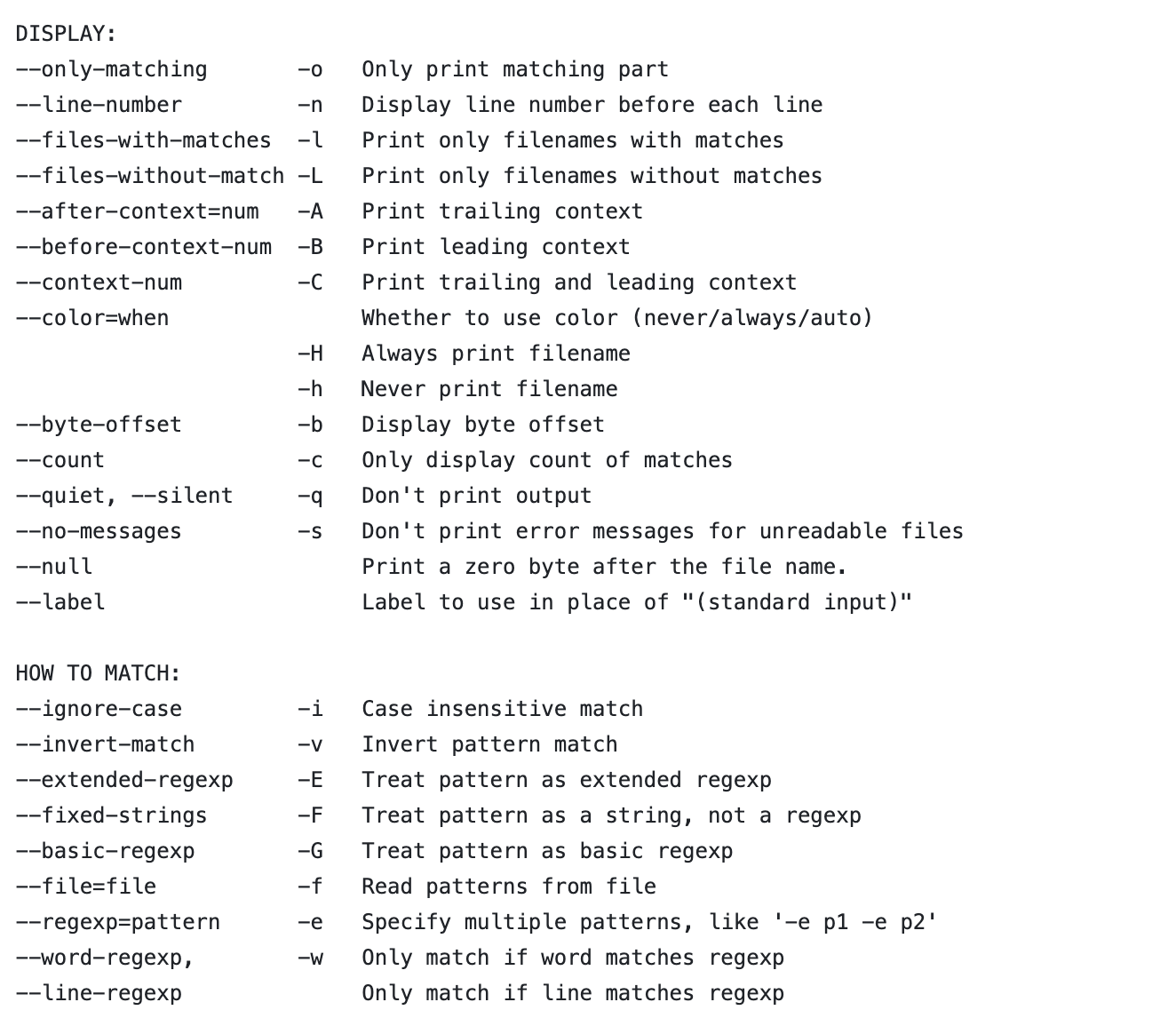
i tried implementing this OUTPUT SUMMARY format for grep's man page, I can't tell if I like it or not but it's an interesting exercise to try to give a 1-line description of each item, categorize them, and then order them most-frequently-used-by-me first https://gist.github.com/jvns/9f5966633875a4758e0d947a5b4dbdcf
(probably some of the descriptions are wrong, I only thought about them for maybe 3 seconds each, also this is Mac grep)
(3/?)
@b0rk I am slightly embarrassed to admit that until I read this thread, and despite using grep for decades, I was somehow unaware that there was a "-w" option. thank you for making it obvious!
@b0rk
The fish shell ships a python script that extracts this information from the man pages and convert them into tab completions.
/usr/share/fish/tools/create_manpage_completions.py
@b0rk @shnizmuffin Count on Apple to f*ck things up:
NAME
openrsync – synchronise local and remote files
SYNOPSIS
openrsync [-0468BCDEFHILOPRSTWVabcdefghiklmnopqrtuvxyz] [-e program]
[-f filter] [--address=sourceaddr] [--append]
[--backup-dir=directory] [--bwlimit=limit]
[--cache | --no-cache] [--
etc.
@b0rk Special shout out to the official web address, since it's got hyperlinks on all the options:
@shnizmuffin thanks, will change my link!
I use `man date` very often when I have to format dates - most programming languages use the same syntax so it's convenient when I don't remember if %m is "month" or "minute"
I like it because I know where to look and it works for a *lot* of programming languages (Go and php being rare exceptions)
@b0rk @shnizmuffin if something needs a solid man page, it's probably sync.
Destroyer of files.
With great power comes great responsibility.
@b0rk I don't believe to have a favourite. Yet, due to the rule (rather 'tip') "'Select' Isn't Broken", select(2) and the corresponding story behind the tip from the book "Pragmatic Programmer" comes to my mind :)
@b0rk I do like it too, even thought it makes the man page 7195 lines long 😃 .
I love the man bash
But although the lvm commands man. With useful examples that cover lot of case !
@b0rk the one I've used the most is `man bash`, because it's not just a man page, it's the documentation for the whole scripting language!
@technicaladept @nabnux i think for bash specifically I might prefer to use the html bash reference manual to reference the docs https://www.gnu.org/software/bash/manual/bash.html (which I believe has the same content but with better formatting)
@b0rk @nabnux these day's yes. Back in the day the next best was to send it to the line printer and read it on a fan fold continuous feed printout. Many people I knew kept a copy on their desk. https://en.wikipedia.org/wiki/Continuous_stationery#/media/File:Endlospapier_fan-fold_paper.jpg
@b0rk I was always partial to `man man`.
Great to introduce people to `man` so they can bootstrap their command-line-fu.
@b0rk Off the dome, I feel like I remember the man page for find almost always getting me where I needed to go
@b0rk it's `rsync` and it's not even close.
@shnizmuffin what do you like about it? (also: you mean this one right? https://linux.die.net/man/1/rsync)
i like that it takes a different approach to the SYNOPSIS and puts examples before the comprehensive list of all options, I haven't seen that a lot
@b0rk It leads with examples from most common to least common, and sorts its many options following similar logic.
It's basically ...
1. WTF am I looking at. (--verbose et al)
2. Sensible defaults (--archive)
3. How do I change one thing (-no-OPTION)
4. Filepath stuff
5. Link stuff
6. Permission stuff
7. File metadata stuff
8. Config stuff
9. Filter stuff
10. Shit one person needed once
11. --human-readable
12. please don't run forever
12 --version, --help
@shnizmuffin i didn’t even notice the option sorting, that’s so good
@b0rk Awesome post idea :-)
@b0rk The man page for telnet changed my life around 1992. I can't remember exactly why, but hopefully by posting this it'll spur my memory and I can go look it up and remember it and I'll let you know.
@b0rk I...don't think I've ever found a man page readable, tbqh. :(
@thatandromeda I have a hard time with them too, that's why I've been thinking about this
@b0rk @thatandromeda Often I pipe the output of `man` into `less`, then try to search for something like -n, which returns way too many results (e.g. mentions of that option before its definition). I wonder if a better `man` could be made that would let me search through an *index* of options instead of doing a full-text search.
@b0rk it's an uncool example these days but...
i always really appreciated how `man perl` links to 40+ other man pages that collectively describe the entire language and its standard library and tools. so if you are trying to learn about it everything you need is there and can be browsed or searched for. the prose is fairly engaging and well-written.
(these days online might make more sense but at the time having it available offline in a very lightweight format that was readable from the terminal was great.)
P.S. the manual pages are actually produced by perldoc which is also a very cool related tool.

@d6 this is so cool, I've never looked at this before! makes me want to find out who wrote them.
I have a soft spot for "man ascii"
@b0rk grep(1) because I have to pull it up every time I forget whether the string or the filename goes first! Also its example section is very good too.
@bretthaines the Mac grep man page?
@b0rk yes, my work computer is a mac so that's the one I pull up more often. I forgot the Linux one is different 😅
@b0rk i frequently use ascii(7)
I have a soft spot for `man ascii`
@b0rk my favourite is quite simple: `man ascii`
@b0rk The entire perl ecosystem. perlfunc(1), perlsyn(1), etc.
@aredridel @b0rk oh, my favorite there is perllol(1)
@arrjay @aredridel this is awesome, I love `perlcheat`, I've never seen anything like that in a man page
@b0rk @arrjay @aredridel perlre(1) — along with perlretut(1) and perlrequick(1) — are the Complete Beginner's Guide to Regular Expressions. The language is quite gentle, especially for a subject that so many people find difficult.
@b0rk mine's probably OpenBSD's utf8(7): https://man.openbsd.org/utf8