Discussion
Loading...

Post

Log in
  • About
  • Code of conduct
  • Privacy
  • About Bonfire
Julia Evans
Julia Evans
@[email protected]  ·  activity timestamp 4 hours ago

i feel like i've probably asked this before but has anyone written a fancy command line man page viewer to replace `man`?

(not emacs or vim)

22
  • Copy link
  • Flag this post
  • Block
Peter Krefting
Peter Krefting
@[email protected] replied  ·  activity timestamp 23 minutes ago

@b0rk Not replace, but this script opens in a PDF viewer:

https://www.softwolves.com/wolfblog/2024/11/19/making-man-pages-easier-to-read/

I did write a simple HTML man page render back at university (1997), I wonder if I still have the sources for that...

https://www.softwolves.com/wolfblog

Making man pages easier to read

  • Copy link
  • Flag this comment
  • Block
Puppethead
Puppethead
@[email protected] replied  ·  activity timestamp 2 hours ago

@b0rk Maybe something like manx? It's for macOS but it is just a bash script so maybe it could be tweaked for other platforms.

https://github.com/jakshin/manx

GitHub

GitHub - jakshin/manx: A command-line utility which opens man pages in various convenient ways on macOS

A command-line utility which opens man pages in various convenient ways on macOS - jakshin/manx
  • Copy link
  • Flag this comment
  • Block
kenan
kenan
@[email protected] replied  ·  activity timestamp 2 hours ago

@b0rk https://github.com/filiparag/wikiman
or I also use Television for fuzzy finding and then opening the pages in bat with man.

https://alexpasmantier.github.io/television/

Television

A fast, portable and hackable fuzzy finder for the terminal.
GitHub

GitHub - filiparag/wikiman: Wikiman is a universal offline documentation search engine for manual pages, tldr-pages, ArchWiki, Gentoo Wiki, DevDocs, and FreeBSD documentation

Wikiman is a universal offline documentation search engine for manual pages, tldr-pages, ArchWiki, Gentoo Wiki, DevDocs, and FreeBSD documentation - filiparag/wikiman
  • Copy link
  • Flag this comment
  • Block
Flohw
Flohw
@[email protected] replied  ·  activity timestamp 3 hours ago

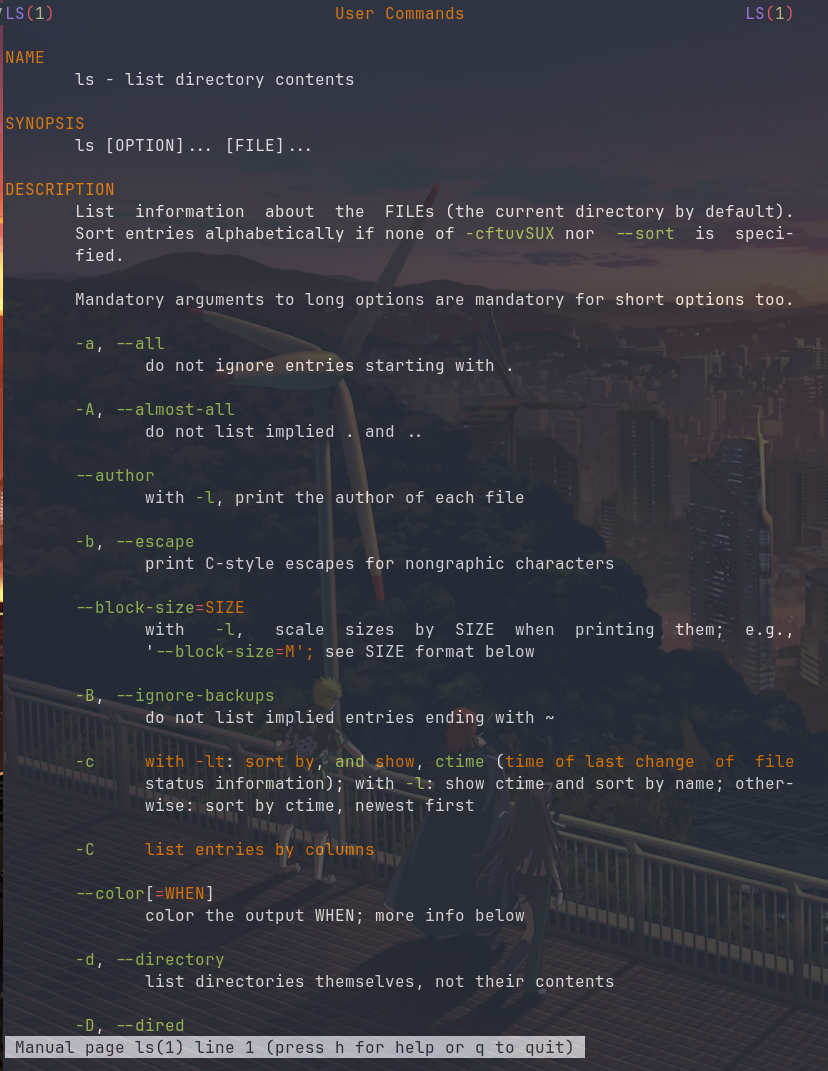
@b0rk I use [bat](https://github.com/sharkdp/bat) with this env var `export MANPAGER="sh -c 'col -bx | bat --language man --plain'"`
This look like this.

Man page of ls, with bat as a pager
GitHub

GitHub - sharkdp/bat: A cat(1) clone with wings.

A cat(1) clone with wings. Contribute to sharkdp/bat development by creating an account on GitHub.
  • Copy link
  • Flag this comment
  • Block
Julia Evans
Julia Evans
@[email protected] replied  ·  activity timestamp 3 hours ago

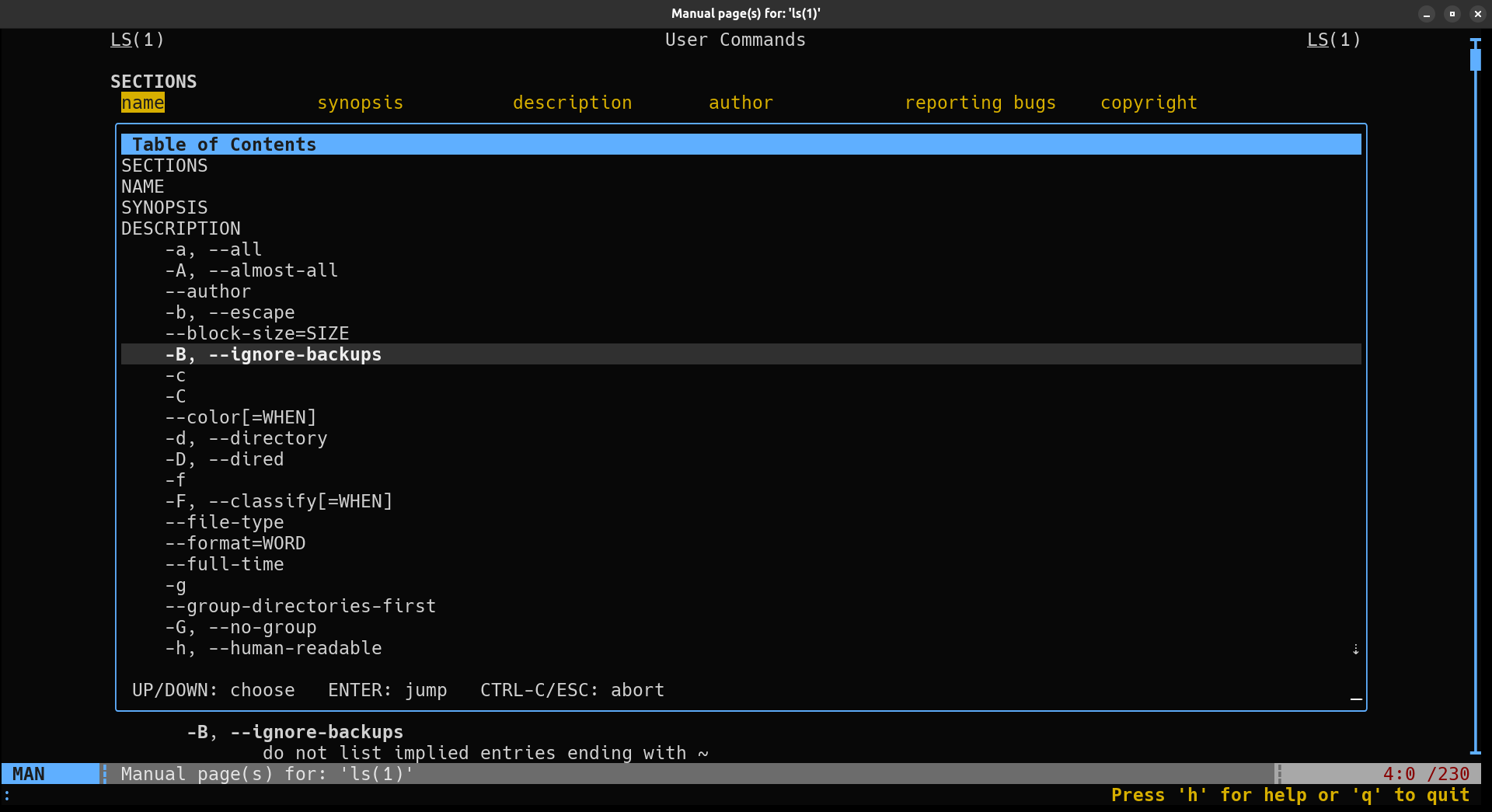
qman looks interesting but on my machine it takes several seconds to start https://github.com/plp13/qman

Sorry, no caption provided by author
GitHub

GitHub - plp13/qman: A more modern man page viewer for our terminals

A more modern man page viewer for our terminals. Contribute to plp13/qman development by creating an account on GitHub.
1
  • Copy link
  • Flag this comment
  • Block
xmanmonk
xmanmonk
@[email protected] replied  ·  activity timestamp 3 hours ago

@b0rk Looks like a nice tui version of xman, which is one of my favorite guis.

  • Copy link
  • Flag this comment
  • Block
Gaëtan Duchaussois
Gaëtan Duchaussois
@[email protected] replied  ·  activity timestamp 3 hours ago

@b0rk batman from bat ?

  • Copy link
  • Flag this comment
  • Block
echarlie
echarlie
@[email protected] replied  ·  activity timestamp 4 hours ago

@b0rk I guess there's gnu's `info`... And of course each `man` implementation is different; I'm partial to openbsd's, but it is the antithesis of fancy.

  • Copy link
  • Flag this comment
  • Block
M
M
@[email protected] replied  ·  activity timestamp 4 hours ago

@b0rk there are too many to list. `yelp` (Gnome Help) comes to mind. `tldr` is a different approach. Then there are "smart" terminals, integrations, and a host of other things all trying to help us execute commands properly.

  • Copy link
  • Flag this comment
  • Block
acut3
acut3
@[email protected] replied  ·  activity timestamp 4 hours ago

@b0rk I use man with MANPAGER set to `less -ic --use-color -Dd+g -Duc`. Not super fancy, but has a few colors.

  • Copy link
  • Flag this comment
  • Block
Ricardo Signes :sickos:
@[email protected] replied  ·  activity timestamp 4 hours ago

@b0rk Ugggggh if you find a good answer, please repost it with a bright red light. I think the biggest issue is that the roff format is too bankrupt, and we need better linking primitives, but… I might just be jaded.

  • Copy link
  • Flag this comment
  • Block
tomi
tomi
@[email protected] replied  ·  activity timestamp 4 hours ago

@b0rk related but maybe outside of the scope of your question: I have tried to fire woman (mode from emacs) once. But it wasn't as straightforward as thought and I didn't dig further. As I spent more and more time in emacs, I used woman directly and had less need to implement the "trick".

The reason, because there is one except for using emacs itself 😉 is to have the ability to see and navigate the page with a menu and perform search, and filters with tools like Occur that I'm familiar with.

  • Copy link
  • Flag this comment
  • Block
quaff
quaff
@[email protected] replied  ·  activity timestamp 4 hours ago

@b0rk I've been using tldr pages instead of man recently: https://github.com/tldr-pages/tldr-python-client?tab=readme-ov-file

Works pretty well and looks nice!

GitHub

GitHub - tldr-pages/tldr-python-client: :snake: Official Python command-line client for tldr pages 📚.

:snake: Official Python command-line client for tldr pages 📚. - tldr-pages/tldr-python-client
  • Copy link
  • Flag this comment
  • Block
Fabiano Celentano
Fabiano Celentano
@[email protected] replied  ·  activity timestamp 4 hours ago

@b0rk there's a script to use bat for man pages (aptly called batman) https://github.com/eth-p/bat-extras, for syntax highlighting and some other stuff

GitHub

GitHub - eth-p/bat-extras: Bash scripts that integrate bat with various command line tools.

Bash scripts that integrate bat with various command line tools. - eth-p/bat-extras
  • Copy link
  • Flag this comment
  • Block
clar fon
clar fon
@[email protected] replied  ·  activity timestamp 4 hours ago

@b0rk have routinely lamented the fact that there isn't a version called woman

  • Copy link
  • Flag this comment
  • Block
Juanjo Salvador
Juanjo Salvador
@[email protected] replied  ·  activity timestamp 4 hours ago

@b0rk man $1 | lolcat

Fancy ✨️

  • Copy link
  • Flag this comment
  • Block
kholerik (they/them)
@[email protected] replied  ·  activity timestamp 4 hours ago

@b0rk You can read them with bat using batman. Only mildy fancy, though.

  • Copy link
  • Flag this comment
  • Block
Zaͩnͦsͤt̀́rͤa̅̆̈
Zaͩnͦsͤt̀́rͤa̅̆̈
@[email protected] replied  ·  activity timestamp 4 hours ago

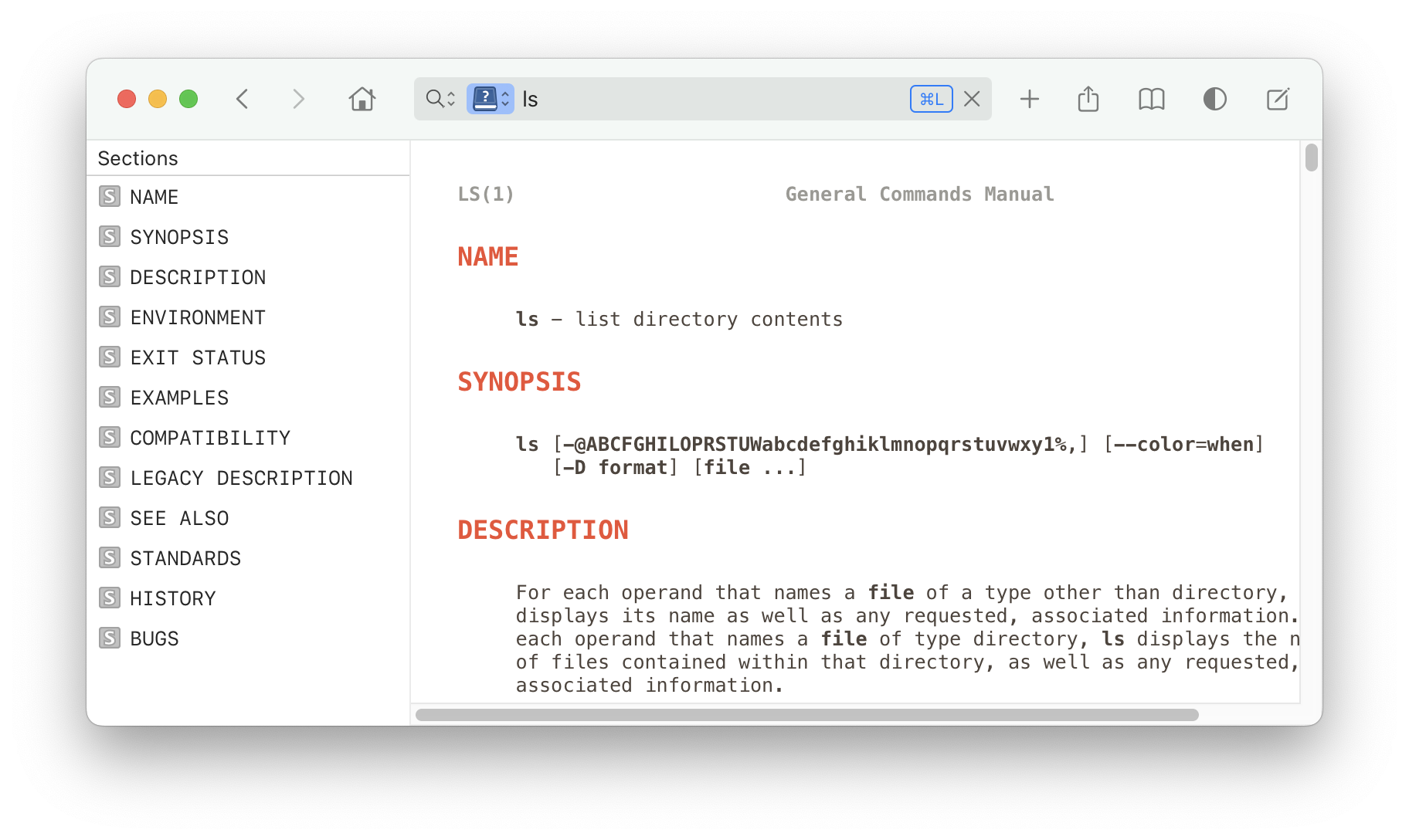
@b0rk There is Dash.app for MacOS, which natively supports man-pages (and more API documentation and cheat-sheets).

Screenshot of a MacOS window of Dash.app.
Top row shows a location bar with `ls` amongst other buttons.
Left there is a list of sections.
Right is the man-page itself.
Screenshot of a MacOS window of Dash.app. Top row shows a location bar with `ls` amongst other buttons. Left there is a list of sections. Right is the man-page itself.
1
  • Copy link
  • Flag this comment
  • Block
Julia Evans
Julia Evans
@[email protected] replied  ·  activity timestamp 3 hours ago

@doekman it's so nice! my dream is that somehow someone has made something like that for the terminal

  • Copy link
  • Flag this comment
  • Block
onor.io
onor.io
@[email protected] replied  ·  activity timestamp 4 hours ago

@b0rk May be some stuff worth trying here: https://alternativeto.net/software/linux-man-pages/ (Full disclosure--just found the article--I haven't tried the alternatives.)

  • Copy link
  • Flag this comment
  • Block
1-bit machine goth
1-bit machine goth
@[email protected] replied  ·  activity timestamp 4 hours ago

@b0rk neovim https://neovim.io/doc/user/filetype.html#_man

Filetype - Neovim docsNeovim

Neovim user documentation
  • Copy link
  • Flag this comment
  • Block
Peter Brett
Peter Brett
@[email protected] replied  ·  activity timestamp 4 hours ago

@b0rk Does Emacs count?

1
  • Copy link
  • Flag this comment
  • Block
Julia Evans
Julia Evans
@[email protected] replied  ·  activity timestamp 4 hours ago

@krans i'm happy for emacs users but I am never going to use emacs so no :)

1
  • Copy link
  • Flag this comment
  • Block
aerique
aerique
@[email protected] replied  ·  activity timestamp 3 hours ago

@b0rk @krans Girl!

  • Copy link
  • Flag this comment
  • Block
Simon Cozens
Simon Cozens
@[email protected] replied  ·  activity timestamp 4 hours ago

@b0rk There used to be pman (symlink to the lynx-based info viewer pinfo) back in the day.

  • Copy link
  • Flag this comment
  • Block
David Adam
David Adam
@[email protected] replied  ·  activity timestamp 4 hours ago

@b0rk what would fancy look like? There's a manpage browser in Emacs which IIRC does hyperlinking, but that is as fancy as I've seen it get

1
  • Copy link
  • Flag this comment
  • Block
Charlie Stross
Charlie Stross
@[email protected] replied  ·  activity timestamp 18 minutes ago

@zanchey Isn't that just GNU info? (Which is a shitty excuse for a hypertext system the FSF pushed for *decades* as a replacement for man pages and which was a huge regression in terms of standardized format and actual useful information.)

  • Copy link
  • Flag this comment
  • Block

bonfire.mavnn.eu

News and community around mavnn.eu projects.

bonfire.mavnn.eu: About · Code of conduct · Privacy ·
Bonfire social · 1.0.1 no JS en
Automatic federation enabled
Log in
  • Explore
  • About
  • Public Groups
  • Code of Conduct